Usage and limits
Every account has two limits running on separate clocks: a rolling 5-hour one and a 7-day one. An account can be fine on one and nearly out on the other, so both are always shown.
Seeing usage
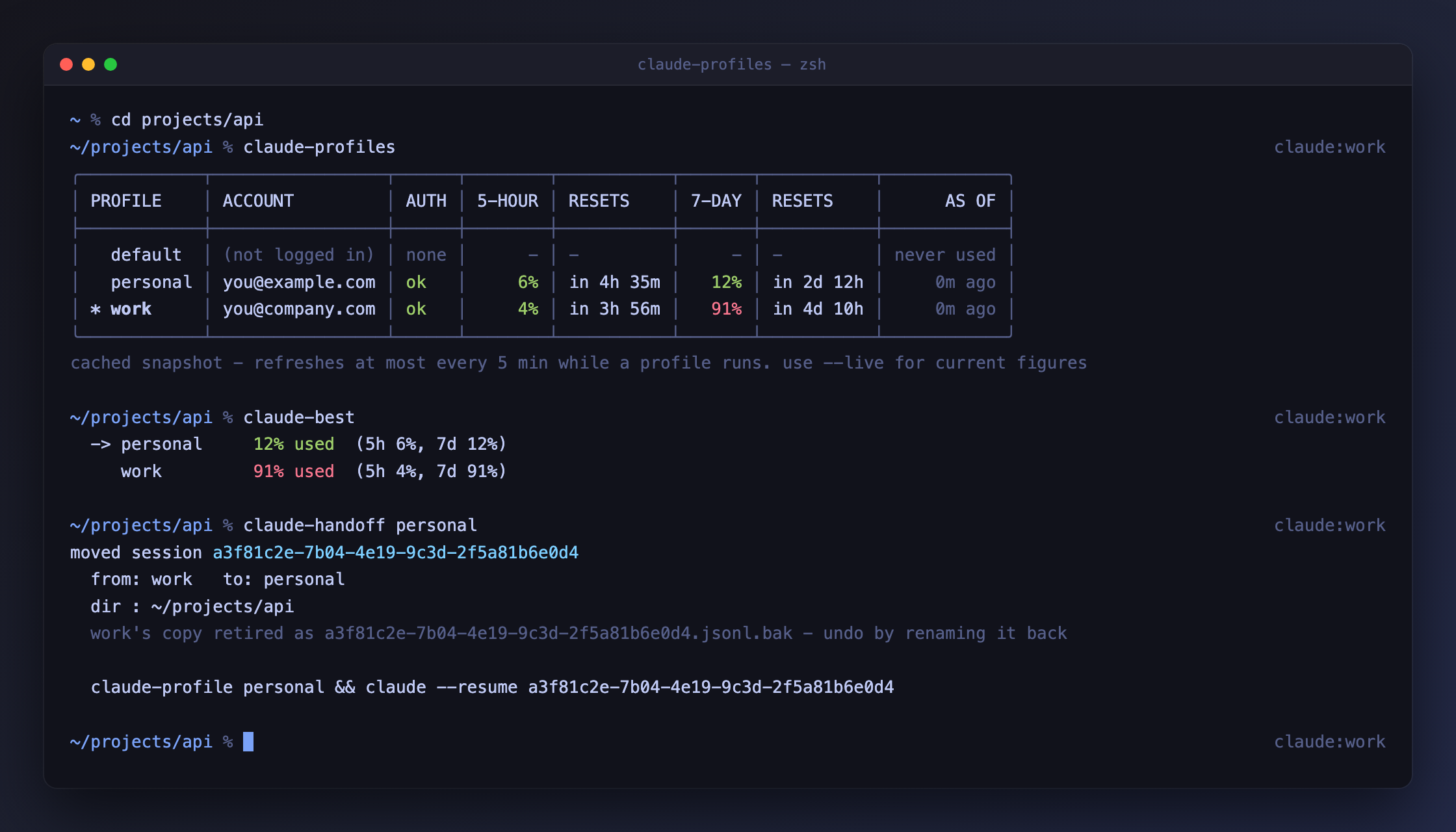
The example above shows the situation this tool exists for: work has plenty
of its 5-hour limit left but is 78% through its week, while personal is the
other way round. Neither number alone would tell you which account to use.
Live figures
Fetches each signed-in profile's current usage directly, in parallel, and shows
live in the AS OF column. This costs no model tokens - it reads a usage
endpoint, it does not run a prompt.
Any profile whose fetch fails falls back to its cached snapshot and says
why in the AS OF column, so the table always renders:
| Shown | Meaning |
|---|---|
live |
fetched just now |
14h ago (token expired) |
the access token has aged out - see below |
14h ago (rate limited) |
the usage endpoint returned 429; try again shortly |
14h ago (unreachable) |
no network, or the request timed out |
14h ago (not logged in) |
no credentials for that profile |
Expired tokens
Access tokens are short-lived - roughly half a day - and Claude Code refreshes
them whenever it runs. A profile you have not used since its token aged out
returns 401, so --live reports token expired and falls back.
Open a session under that profile and the token refreshes:
Why this tool does not refresh tokens itself
It could, using the stored refresh token. But refresh tokens can change each time they are used, and writing a new one back could put Claude Code's own copy out of step. Reporting the problem is safer than competing with Claude Code over credentials.
claude-doctor also warns about expired tokens, so you can spot them before
they surprise you.
What this sends, and where
--live reads that profile's token from your Keychain on macOS, or from its
.credentials.json elsewhere. It sends that token to api.anthropic.com -
the same host Claude Code already uses. Nothing goes anywhere else.
Unofficial endpoint
The usage endpoint is internal to Claude Code and is not a documented public
API. It may change or disappear in any release, which is why the cache
remains the default and --live degrades to it rather than failing.
A live fetch is remembered
--live saves what it fetched next to the profile. A plain claude-profiles
straight afterwards shows those same figures as 0m ago, instead of falling
back to a much older snapshot.
Why the cache is stale
Read the AS OF column
Without --live, figures come from whichever cache is newer.
Claude Code writes one, but only while that profile is running, and no
more than once every five minutes. --live writes the other. A profile you
have not used today shows figures from whenever you last used it. A profile you have not used today shows figures from whenever you
last used it; one that has never run shows never used.
The AS OF value turns amber once the snapshot is more than a day old.
The cache stays the default because it is instant and needs no network. Reach
for --live when the numbers actually matter - deciding which account to start
a long session on, for instance.
Two accounts showing ok at once is normal and expected - that is the whole
point. See How it works for where credentials live per OS.
claude-best
Names the signed-in account with the most headroom.
A profile is judged by its tightest limit, not its average.
An account at 1% for the next five hours but 95% through its week is nearly out. It is ranked accordingly. Accounts that are locked out or not signed in are skipped.
| Flag | Effect |
|---|---|
-q, --quiet |
print just the name, for scripting |
--cached |
skip the live fetch and use cached figures |
Fetches live by default, so it reflects reality rather than a stale snapshot.
claude-auto
Launch Claude on whichever account has the most headroom, without choosing yourself.
It resolves claude-best --quiet, reports the choice on stderr, then runs
claude under that profile via claude-profile-exec - so your shell's own
profile is unchanged.
When to use which
Use claude-profile when the account matters (client work, a specific
subscription). Use claude-auto when it does not and you just want
capacity.