Session handoff
What it does, simply: it moves a conversation from one account to another, so you can keep going when the first account runs out.
The problem
You are 50 messages into a conversation. Claude knows your whole problem. Then:
You've hit your usage limit.
Your other account has capacity. But Claude Code cannot see this conversation from there - each account keeps its own separate history.
The fix
That moves the current conversation into the work account's history and
prints the command to continue it:
moved session 0a9014e8-8806-43cf-98fd-28fad1353923
  from: default   to: work
  dir : ~/projects/<project-name>/api
  side files: 24 copied
  default's copy retired as 0a9014e8-8806-43cf-98fd-28fad1353923.jsonl.bak - undo by renaming it back

  claude-profile work && claude --resume 0a9014e8-8806-43cf-98fd-28fad1353923
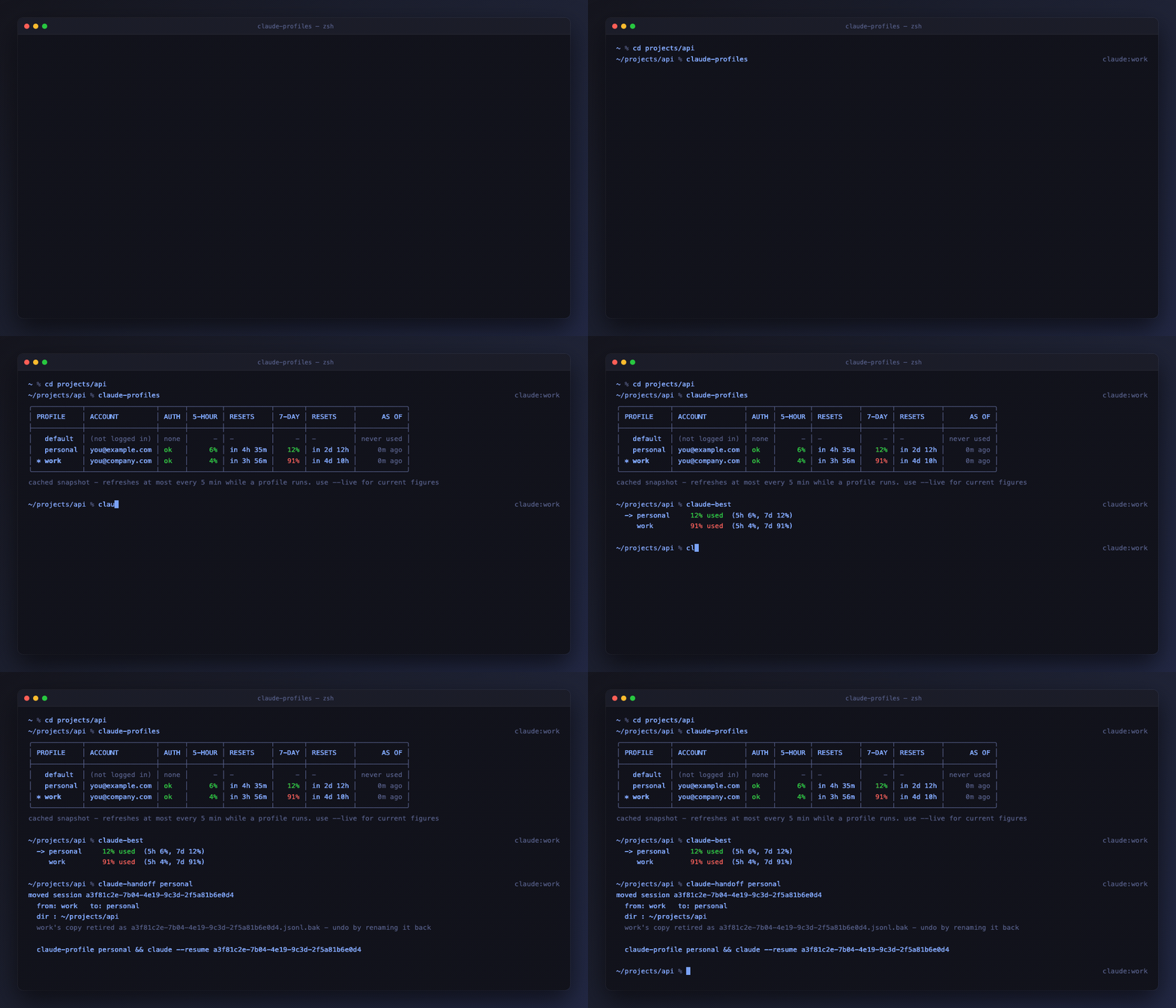
Run that, and you are back in the same conversation with the same memory - on a different account with its own quota.
Analogy
Like forwarding an email thread to your other address. The thread is identical; only the mailbox changed.
Bringing the project's memory too
Claude Code saves memory per profile and per project, and a plain handoff moves only the conversation. The conversation carries everything that was said, so you can keep working - but facts Claude had saved about the project stay behind.
That merges the saved memory into the other account: new facts are copied,
existing ones are left alone, and if the same fact differs on both sides both
are kept so you can decide later. Add --dry-run to see the plan first.
Handing it back
Once the first account's limit resets you can hand the session back the same
way. Normally the original is a .bak by then and the move just works. If you
used --copy and both sides have moved on since, the handoff refuses rather
than overwriting, and tells you which one is further along:
work already has this session and it would be overwritten
  work: 7 turns   personal: 4 turns  - the copy in work is further along
claude-sessions -A -a marks the leading copy with * so you can see where to
resume without counting.
What it does not do
- Does not lose anything. The original is renamed to
<session-id>.jsonl.bak, not deleted, so a handoff that went somewhere unexpected is one rename from undone. - Does not leave half the session behind. Big tool results and subagent transcripts live in a
<session-id>/directory beside the file. They travel with it. (detail) - Does not touch your code. Same project folder, same files, same git branch.
- Does not transfer your limit. That is the point: the other account has its own quota.
One catch
Run it from the folder you were working in. It finds the conversation by which folder it belongs to.
If you are somewhere else, point at the directory explicitly:
Picking a specific conversation
By default it takes the most recent one. To choose, list them first:
   WHEN      TURNS  SESSION ID                            SUMMARY
 1 2m ago       18  eb82f424-4aff-43eb-a0e1-f1e130553fc6  refactor the auth middleware…
 2 Sep 11        2  2c24a68b-8411-4bb6-9072-99b86b5ae909  cant able to take pull
Then pass the id - a prefix is enough:
An ambiguous prefix lists the candidates rather than guessing.
What actually moves
~/.claude/projects/<encoded-dir>/<session-id>.jsonl
        |  copied, preserving the encoded directory name
        v
~/.claude-profiles/work/projects/<encoded-dir>/<session-id>.jsonl

~/.claude/projects/<encoded-dir>/<session-id>.jsonl
        |  then renamed, once the copy is verified byte for byte
        v
~/.claude/projects/<encoded-dir>/<session-id>.jsonl.bak
The <session-id>/ directory of side files beside the transcript moves the same
way: files the target does not have are copied, and the source directory is
removed once every one of them is confirmed identical.
The source is only touched after the target is confirmed identical. If the copy does not verify, the source is left exactly as it was.
Only the profile root changes. The file is byte-for-byte identical, so every working directory recorded inside it still points at the original project.
claude --resume only looks inside the active profile's projects/ directory.
That is exactly why handoff is needed - the other account is not hiding the
conversation, it genuinely cannot see the file.
Cost
Resuming re-sends the conversation to the new account, so its first turn is a cold prompt cache and costs more tokens than an ordinary continuation.
Handing it back
Works in either direction, and it is the same operation: the conversation moves
back, and the copy in the profile you left becomes a .bak.
Keeping both copies
Sometimes you want the original left in place - to try something on another account without committing to it, say.
Both profiles then hold the session and continue independently from that point.
claude-sessions -A -a marks the one with the most turns with *.
To make that your default:
--move overrides it for a single command.